Showing posts with label jailbreak. Show all posts

How to Jailbreak iOS 9.2 - iOS 9.3.3 without a computer for lifetime


It's been a long time since the launch of PanGu Jailbreak  for iOS 9.2 - iOS 9.3.3 systems,  despite the release of iOS 9.3.4 but Jailbreak possible in the current period as well as it became possible to install PP jailbreak without a computer and for a lifetime.

The new method can be followed directly through your device, which is available from 25PP company assistance to Chinese hacker team PanGu , and since they do not require Apple ID data, it can be considered safe for a large extent.


NOTES on how to jailb reak IOS 9.3.3 - IOS 9.2 


This method works on 64bit devices 

Supported Systems :

  • iOS 9.2
  • iOS 9.2.1
  • iOS 9.3
  • iOS 9.3.1
  • iOS 9.3.2
  • iOS 9.3.3

If you have a supported device with a unsupported system so you need to  install IOS 9.3.3 system on your device 

Jailbreak  iOS 9.2 - iOS 9.3.3 without a computer for lifetime .


1. if you have a jailbreak on your device make sure to delete PP - Pangu app

2. Through your device go to safari browser and move to this link
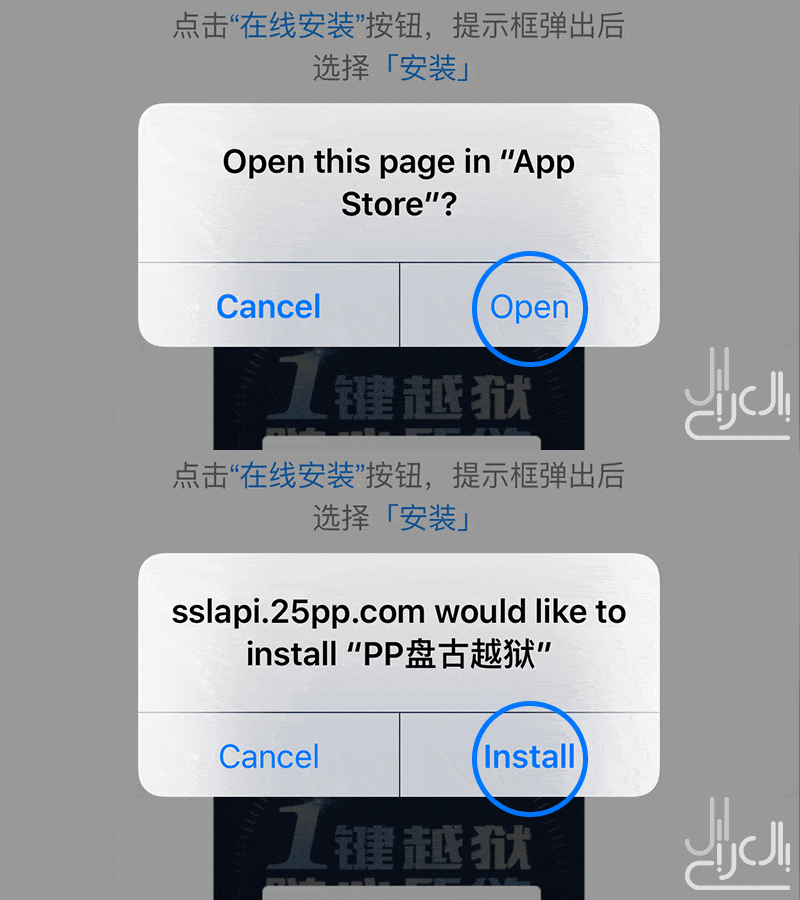


3. Wait for the system to ask you if you want to open this link on app store click open then click install

4. Once you clicked install go back to the main screen ,you will find the PP App downloading , Once the downloading turn to installing turn your phone to the FLIGHT MODE 

5. After finishing the install close the FLIGHT MODE

6. Go to Setting> General> Device Management/ Profile>Trust> Trust

7. Open PP App remove the mark from the middle of the Circle then click on the big circle then close the screen and wait 5 minutes 

8. Restart your device and you will find that jailbreak is not working you just need to repeat step number 7 again


This Jailbreak will lasts for one year , after one year you have two options the first one is to renew your jailbreak by doing these steps again , second option is reset the date to the last year which will be 2016 .


Jailbreak iOS 8.1.2 on a Mac from PP


Chinese PP team issued a new jailbreak tool compatible with System 8.1.2 on a 
Mac

It works with all the iOS 8 – 8.1.2 compatible devices:

  * Here are some important points before Jailbreak:

 I-  1 - Make a backup copy of your iPhone to keep personal file

I-  2 - temporarily disable any anti-virus or firewall software, which can prevent the tool from the Internet connection

I-  3 - Please handle carefully with tool because we do not have confirmation that the jailbreak security

* Jailbreak supports the following devices:

iPhone 6, iPhone 6 Plus, iPhone 5s, iPhone 5c, iPhone 5, iPhone 4S

iPad Air 2, iPad Air, iPad 4, iPad 3, iPad 2

iPad mini 3, iPad mini 2, iPad mini, iPod touch 5G


* Jailbreak action steps:

 I- 1 - Download the PP jailbreak tool for Mac download link for windows users here for mac users here

I- 2 - Connect the device to your computer using a USB cable

I- 3 - disable password lock settings and disable Find My iphone service from the I Cloud

I- 4 - Open the tool will take time to get to know your device uncheck the mark at the bottom

So  not installation of the Chinese store facilities Jailbreak


I- - click on the button in the center and wait until the device restarts

I- 6 - has been completed and the emergence of Jailbreak Cydia on the iPhone.


Happy Jailbreak 


How to get your root to update Android 5.0 for   Galaxy S4 phone


If you've got an update to Android 5.0 Galaxy S4 phone , which Samsung has recently begun releasing it, and lost the old Root after the update or you even want to get Root in your phone for the first time. We offer you this special access to the S4 Root way.


Note that these steps dedicated exclusively to _ Galaxy S4 GT-I9500


  .Take a backup copy of your files

Download The Adb tool from here and installed like any normal program on your computer, a  tool that does not bear any interface software but very necessary to complete this process

Download Samsung definitions from here and installed like any normal program

Download "Odin" program from here decoding compress the file to a new folder on your desktop.

Download allocated "Phliz" Recovery from here.

Put your phone in the status of "Download Mode", by pressing the power button and the main menu button volume down together, then the screen will show you read the alerts and press the volume up button, you should show you in the next screen, the word 


"Downloading" under Android logo.

Connect your phone to your computer.


Turn on "Odin" program, and then connect your computer via a "USB" should notice the word "Added" displayed on the status box, and lighting box under the words "ID Com", be sure to turn off the "Reapartion" option and run Two choices
 "Auto Reboot" and "F.Reset Time"

from "Odin" program click on "PDA" button and then specify the allocated Recover file, and then click "Start" to begin the installation of the Recovery .

You will notice the appearance of the line is moving in the lower section of the screen, and when it ends the device will re-boot automatically.

After the end of the take-off, turn  off the phone _Then /  turn on your phone again, then Login to Into Recovery Mode by pressing the power button and the main menu button and the volume up press the 3 buttons one time and hold for 10 sec when you say the light take 
your hand off.

Clicking on the "Settings" button Then, "Re-root System" then "Yes Apply SuperSU".

Download the app of "Super SU" from store "Google Play".

Open the app, you will see a message containing the following question "how do you want to update binary?" "How do you want to update binary data" then choose "Normal".

Then restart the phone.


So you have got the powers of the "Root" on your phone

{ Android Revolution }


{Learn How To Create Android Apps Like    Candy Click Here To Start Your Own  Android Revolution} 


How to download apps for free after Jailbreak IOS 8.1.2-


 First If You Don't Know How To Jailbreak Open This Link Download Jailbreak And Learn How To Do It k

how-to-jailbreak-ios-812

 How to download paid apps or games for free on your iPhone or iPad after jailbreak iOS 8.1.2 or even iOS 8.1.1 What are the best stores which  submit apps to be downloaded for free


After doing a jailbreak by  -Tiag-  It Will come with its own tool from Afc2add
Which allow you full access to the files on your device the iPhone

AFC acronym for Apple File Conduit and how can computer programs such as iTunes and iPhoto can read and write files from your computer via USB.It is also required in our topic today for estimated bearing apps and install IPA from outside the store.

My Source

http://cydia.myrepospace.com/abo1bs/


But there is another important tool which AppSync,. The best tool AppSync iOS 8 is found in the source name AppSync 5.X -> 8.X. All you have to do is just add this source have in Cydia and install it on your iPhone or iPad and then, re-run.


The last thing is what is the best store in the stores alternative to the App Store
? Which offers games and apps for free


 AppCake 


Explicitly, I was not convinced of this store a long time ago, but I discovered that the best
  For the simple reason that some of the big-sized Games when download  it gives you a torrent link And I guess that's comfortable for me  And you can download AppCake from the same source

My Source 


Tongbu


It is a wonderful Chinese store, all you have to do is enter this link from here to the site and click on the first blue button and the apple icon and press Install.


My Source